

Conception
- Comment préparer les fichiers pour l’impression
- Comment réduire la taille d’un fichier pour l’impression textile sans perte de qualité ?
- Pourquoi mon design paraît-il flou dans l’éditeur ?
- Puis-je télécharger des fichiers avec une résolution supérieure à 300 dpi ?
- Qu'est-ce qu'un mètre linéaire ?
- Est-ce que mon design reste confidentiel ?
- Puis-je imprimer des photos sur du tissu ?
- Que faire si je ne peux pas télécharger mon design ?
- Quel profil colorimétrique utiliser pour l’impression textile ?
- Comment commander un produit textile personnalisé avec mon design ?
- Y a-t-il un minimum de commande pour les produits textiles personnalisés ?
Production
- Votre impression est-elle écologique ?
- Avec quelle technique et quelles machines imprimez-vous ?
- Quelles méthodes d’impression sont disponibles pour les articles textiles personnalisés ?
- Qu'est-ce que le traitement préalable et à quoi sert-il ?
- Quelle est la différence entre l’impression DTF et la sublimation ?
- Qu’est-ce que la certification OEKO-TEX et pourquoi est-elle importante ?
- Pouvez-vous imprimer sur des tissus foncés ?
- Comment entretenir les tissus imprimés et les vêtements DTF
- Comment obtenir des couleurs précises en impression textile personnalisée
- Qu’est-ce que l’impression pigmentaire numérique sur tissu et en quoi diffère-t-elle de la sublimation ?
Vente en gros et B2B
- Y a-t-il un minimum de commande pour l’impression de tissu en gros ?
- Comment passer une commande d’impression de tissu en volume ?
- Muzefab propose-t-il le fulfillment en marque blanche et le dropshipping ?
- Puis-je obtenir une facture avec TVA pour la commande de mon entreprise ?
- Comment fonctionne la confection cut and sew chez Muzefab ?
- Comment obtenir un devis personnalisé pour une commande importante ou complexe ?
Mes commandes
Comment préparer les fichiers pour l’impression
Pour l’impression textile, respecter les bonnes consignes lors de la préparation des fichiers garantit un résultat de haute qualité. Voici les étapes clés pour bien formater vos fichiers.
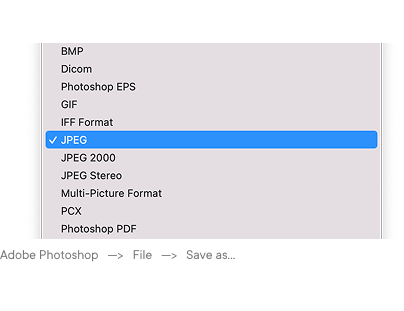
Format de fichier
Envoyez votre design dans l’un des formats suivants :
- JPEG : acceptable pour les images photographiques sans transparence, en qualité maximale (sans compression)
- TIFF : recommandé pour les impressions photographiques et les dégradés complexes ; accepte la compression sans perte
- PNG : recommandé pour les designs avec transparence ou éléments graphiques nets
N’envoyez pas directement de fichiers PDF, AI, PSD ou SVG : exportez-les en PNG ou TIFF avant le téléchargement.
Mode colorimétrique
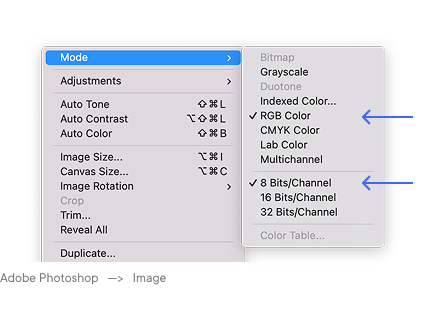
Utilisez le mode RVB pendant toute la conception et au moment de l’envoi. Plus précisément, utilisez le profil sRGB IEC61966-2.1, le profil standard sur lequel nos systèmes d’impression sont calibrés.
Ne convertissez pas en CMJN avant l’envoi. Nos imprimantes interprètent directement les valeurs RVB ; une conversion CMJN ajoute une transformation de profil inutile qui peut décaler les teintes et réduire la saturation. Si votre fichier a été créé en CMJN (par exemple dans InDesign ou Illustrator pour l’impression papier), reconvertissez-le en sRGB avant de le télécharger.
Utilisez une profondeur de couleur de 8 bits. Les fichiers 16 bits sont acceptés mais traités en 8 bits : envoyer des fichiers 16 bits n’apporte aucun gain de qualité.
Résolution et taille de fichier
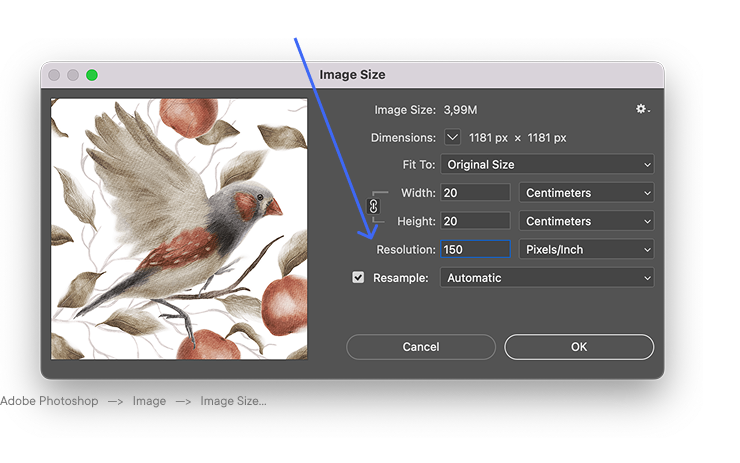
En impression textile, la résolution se mesure par rapport à la taille d’impression réelle, et non à la taille d’affichage à l’écran.
- Résolution recommandée : 150 dpi à 100 % de la taille d’impression
- Résolution minimale : 100 dpi à 100 % de la taille d’impression
- Résolution maximale utile : 300 dpi (au-delà, la qualité ne s’améliore pas et les fichiers deviennent inutilement lourds)
Dimensions du fichier selon la largeur d’impression
Le tableau ci-dessous indique les dimensions en pixels correctes pour 1 mètre linéaire de tissu à 150 dpi
| Largeur d’impression | 150 dpi (recommandé) |
|---|---|
| 135 cm | 7,953 × 5,906 px |
| 140 cm | 8,268 × 5,906 px |
| 145 cm | 8,583 × 5,906 px |
| 150 cm | 8,858 × 5,906 px |
| 155 cm | 9,173 × 5,906 px |
Largeur × hauteur (1 mètre). Pour les commandes de plusieurs mètres, fournissez un seul motif raccordable : le système le répète automatiquement.
Impression DTF sur produits finis
Pour les impressions DTF sur vêtements et produits textiles finis, l’exigence de résolution porte sur la zone d’impression du produit concerné :
- Résolution recommandée : 300 dpi à 100 % de la taille d’impression prévue
- Résolution minimale : 150 dpi
- Mode colorimétrique : RVB, comme ci-dessus
- Format : PNG avec fond transparent obligatoire, pour un placement précis et des bords nets sur le vêtement ; toute zone non transparente autour du design sera imprimée en blanc
Motifs raccordables
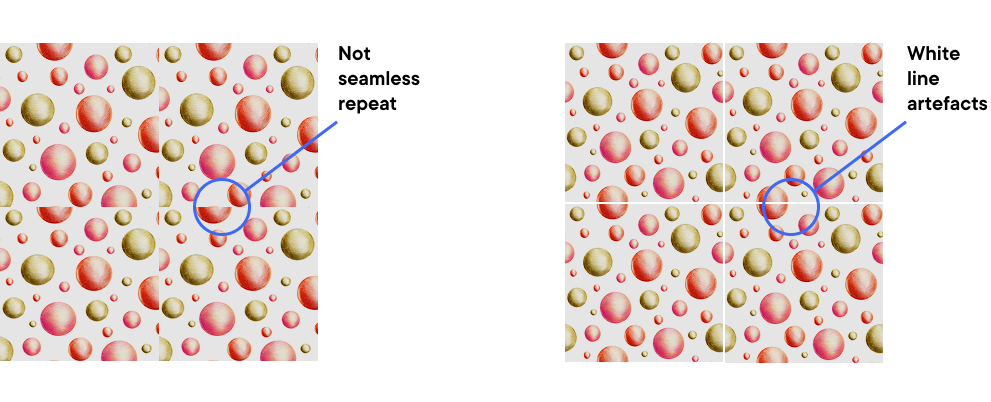
Si votre design est un motif répété, il doit se raccorder sans couture : le bord droit doit correspondre au bord gauche et le bord supérieur au bord inférieur, sans ligne de raccord visible.
Comment vérifier votre motif avant l’envoi :
- Dans Photoshop : utilisez Filter → Other → Offset avec des valeurs égales à la moitié de la largeur et de la hauteur du motif ; toute couture apparaîtra au centre de l’image
- Dans Illustrator : utilisez le panneau Pattern Options pour prévisualiser la répétition
- Dans Affinity Designer : utilisez l’outil Tile dans le persona pixel
Vérifiez aussi l’absence de pixels blancs ou transparents indésirables le long des bords du motif : ils créent des lignes visibles une fois répétés.
Limites de taille de fichier
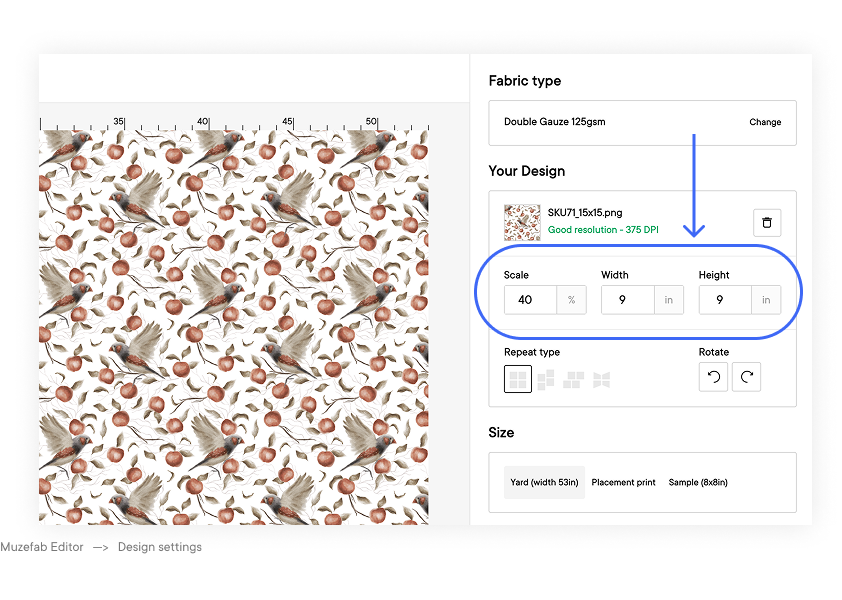
- Taille maximale par téléchargement : 500 Mo
- Si votre fichier dépasse cette limite, voir : Comment réduire la taille d’un fichier pour l’impression textile sans perte de qualité
Liste de contrôle avant envoi
Avant de télécharger votre fichier, vérifiez :
- Le format est PNG, TIFF ou JPEG
- Le mode colorimétrique est RVB (profil sRGB IEC61966-2.1)
- La profondeur de couleur est de 8 bits
- La résolution est de 150 dpi ou plus à 100 % de la taille d’impression
- Pour l’impression de tissu : les dimensions en pixels correspondent à la taille d’impression prévue à 150 dpi
- Pour le DTF : la résolution est de 300 dpi pour la zone d’impression prévue ; le fichier est un PNG à fond transparent (obligatoire)
- Pour les motifs répétés : le motif se raccorde sans couture et les bords sont propres
- La taille du fichier est inférieure à 500 Mo
Articles liés
→ Profils colorimétriques pour l’impression textile
→ Pourquoi mon design paraît-il flou dans l’éditeur ?
→ Comment obtenir des couleurs précises