

Gestaltung
- Dateien für den Druck vorbereiten
- Wie reduziert man die Dateigröße für den Stoffdruck ohne Qualitätsverlust?
- Warum sieht mein Design im Editor unscharf aus?
- Kann ich Dateien mit einer Auflösung von mehr als 300 dpi hochladen?
- Was ist ein laufender Meter?
- Bleibt mein Design privat?
- Kann ich Fotos auf Stoff drucken lassen?
- Was ist, wenn ich mein Design nicht hochladen kann?
- Welches Farbprofil sollte ich für den Stoffdruck verwenden?
- Wie bestellt man ein personalisiertes Textilprodukt mit eigenem Design?
- Gibt es eine Mindestbestellmenge für personalisierte Textilprodukte?
Produktion
- Ist Ihr Druck umweltfreundlich?
- Mit welcher Technik und auf welchen Maschinen wird gedruckt?
- Welche Druckverfahren sind für personalisierte Textilprodukte verfügbar?
- Was ist eine Vorbehandlung und wozu dient sie?
- Was ist der Unterschied zwischen DTF-Druck und Sublimation?
- Was ist die OEKO-TEX-Zertifizierung und warum ist sie wichtig?
- Können Sie auf dunklen Stoffen drucken?
- Wie pflegt man individuell bedruckte Stoffe und DTF-Kleidungsstücke?
- Wie erzielt man präzise Farben beim individuellen Stoffdruck?
- Was ist digitaler Pigmentdruck auf Stoff und wie unterscheidet er sich von Sublimation?
Großhandel und B2B
- Gibt es eine Mindestbestellmenge für Stoffdruck im Großhandel?
- Wie gebe ich eine Großbestellung für Stoffdruck auf?
- Bietet Muzefab White-Label-Fulfillment und Dropshipping an?
- Kann ich für meine Geschäftsbestellung eine Rechnung mit ausgewiesener Mehrwertsteuer erhalten?
- Wie funktioniert die Cut-and-Sew-Produktion bei Muzefab?
- Wie erhalte ich ein individuelles Angebot für eine große oder komplexe Bestellung?
Meine Bestellungen
Zahlung und Lieferung
Dateien für den Druck vorbereiten
When Sie Dateien für den Stoffdruck vorbereiten, sorgen die richtigen Einstellungen für ein hochwertiges Druckergebnis. Nachfolgend finden Sie die wichtigsten Schritte zur korrekten Vorbereitung Ihrer Druckdateien.
Dateiformat
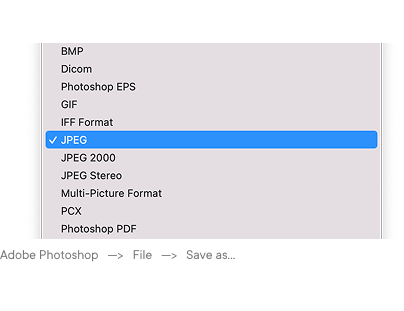
Bitte laden Sie Ihr Design in einem der folgenden Formate hoch:
- JPEG — geeignet für fotografische Motive ohne Transparenz, gespeichert in maximaler Qualität (ohne Komprimierung)
- TIFF — empfohlen für Fotodrucke und komplexe Farbverläufe; unterstützt verlustfreie Komprimierung
- PNG — empfohlen für Designs mit Transparenz oder scharfen grafischen Elementen
Bitte laden Sie keine PDF-, AI-, PSD- oder SVG-Dateien direkt hoch — exportieren Sie diese vor dem Upload als PNG oder TIFF.
Farbmodus
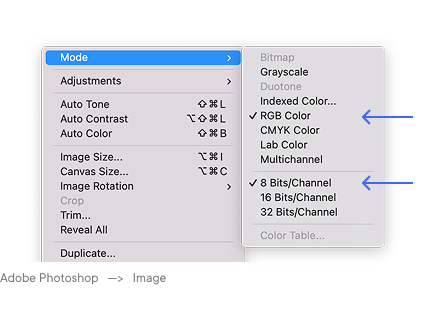
Verwenden Sie während des gesamten Designprozesses den RGB-Farbmodus sowie beim Export der finalen Datei. Nutzen Sie dabei das Farbprofil sRGB IEC61966-2.1 — auf dieses Standardprofil sind unsere Drucksysteme kalibriert.
Bitte konvertieren Sie Ihre Datei vor dem Upload nicht in CMYK. Unsere Drucker verarbeiten RGB-Werte direkt; eine zusätzliche CMYK-Konvertierung kann zu Farbverschiebungen und geringerer Farbsättigung führen. Falls Ihre Datei ursprünglich in CMYK erstellt wurde (zum Beispiel in InDesign oder Illustrator für den Druck), konvertieren Sie sie vor dem Hochladen zurück in sRGB.
Verwenden Sie eine Farbtiefe von 8 Bit. 16-Bit-Dateien werden zwar akzeptiert, jedoch automatisch als 8-Bit verarbeitet — es entsteht dadurch kein Qualitätsvorteil.
Auflösung und Dateigröße
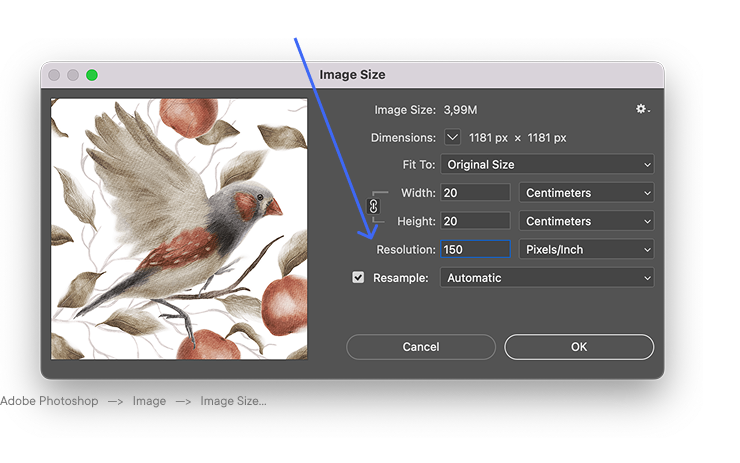
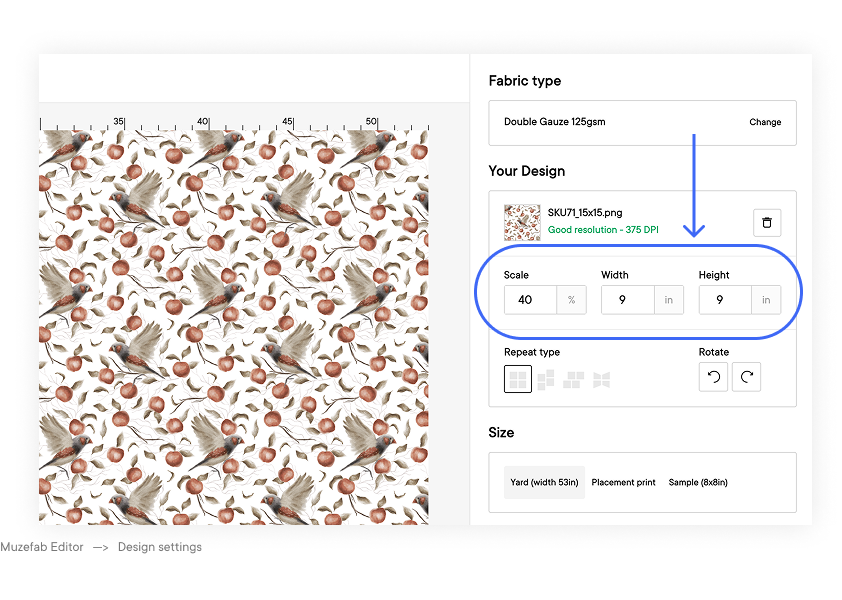
Beim Stoffdruck wird die Auflösung anhand der tatsächlichen Druckgröße bewertet — nicht anhand der Darstellung auf dem Bildschirm.
- Empfohlene Auflösung: 150 dpi bei 100 % Druckgröße
- Minimale Auflösung: 100 dpi bei 100 % Druckgröße
- Maximal sinnvolle Auflösung: 300 dpi (höhere Auflösungen verbessern die Druckqualität nicht und erzeugen unnötig große Dateien)
Dateiabmessungen nach Druckbreite
Die folgende Tabelle zeigt die korrekten Pixelmaße für 1 laufenden Meter Stoff bei 150 dpi.
| Druckbreite | 150 dpi (empfohlen) |
|---|---|
| 135 cm | 7,953 × 5,906 px |
| 140 cm | 8,268 × 5,906 px |
| 145 cm | 8,583 × 5,906 px |
| 150 cm | 8,858 × 5,906 px |
| 155 cm | 9,173 × 5,906 px |
Breite × Höhe (1 Meter). Bei Bestellungen über mehrere Meter reicht eine nahtlose Rapportdatei aus — das System wiederholt das Muster automatisch.
DTF-Druck auf fertigen Produkten
Für DTF-Drucke auf Kleidung und fertigen Textilprodukten beziehen sich die Anforderungen an die Auflösung auf die tatsächliche Druckfläche des jeweiligen Produkts:
- Empfohlene Auflösung: 300 dpi bei 100 % der gewünschten Druckgröße
- Minimale Auflösung: 150 dpi
- Farbmodus: RGB, wie oben beschrieben
- Dateiformat: PNG mit transparentem Hintergrund — erforderlich für eine präzise Platzierung und saubere Kanten auf dem Produkt; nicht-transparente Bereiche außerhalb des Designs werden weiß mitgedruckt
Nahtlose Muster
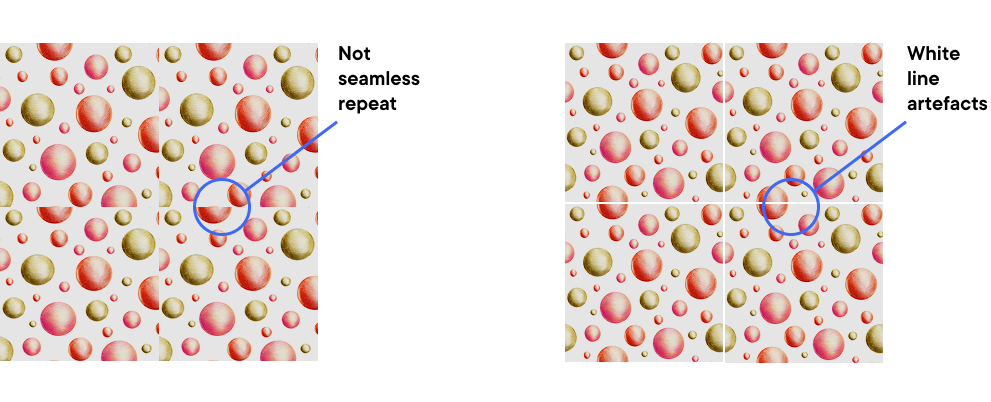
Wenn Ihr Design ein wiederholendes Muster ist, muss es nahtlos kachelbar sein — die rechte Kante muss exakt an die linke anschließen und die obere an die untere, ohne sichtbare Übergangslinien.
So überprüfen Sie Ihr Muster vor dem Upload:
- In Photoshop: Verwenden Sie Filter → Sonstige Filter → Verschiebungseffekt mit Werten entsprechend der halben Breite und Höhe der Datei — sichtbare Übergänge erscheinen dann in der Bildmitte
- In Illustrator: Nutzen Sie das Bedienfeld „Musteroptionen“, um die Wiederholungsvorschau zu prüfen
- In Affinity Designer: Verwenden Sie das Tile-Tool im Pixel-Persona-Modus
Überprüfen Sie außerdem die Kanten Ihrer Datei auf unbeabsichtigte weiße oder transparente Pixel — diese verursachen sichtbare Linien beim Wiederholen des Musters.
Dateigrößenbegrenzung
- Maximale Dateigröße pro Upload: 500 MB
- Falls Ihre Datei größer ist, lesen Sie bitte: So reduzieren Sie die Dateigröße für den Stoffdruck ohne Qualitätsverlust
Checkliste vor dem Upload
Bitte überprüfen Sie vor dem Hochladen Ihrer Datei folgende Punkte:
- Format ist PNG, TIFF oder JPEG
- Farbmodus ist RGB (sRGB IEC61966-2.1-Profil)
- Farbtiefe beträgt 8 Bit
- Auflösung beträgt mindestens 150 dpi bei 100 % Druckgröße
- Für Stoffdruck: Pixelmaße entsprechen der gewünschten Druckgröße bei 150 dpi
- Für DTF: Auflösung beträgt 300 dpi bei der gewünschten Druckfläche; Datei ist PNG mit transparentem Hintergrund (Pflicht)
- Für wiederholende Muster: Rapport ist nahtlos und die Kanten sind sauber
- Dateigröße liegt unter 500 MB
Verwandte Artikel
→ Farbprofile für den Stoffdruck
→ Warum sieht mein Design im Editor unscharf aus?
→ So erzielen Sie präzise Farben beim Druck